
| FIFO Frame Grabbers | |
|---|---|
| This technical brief offers supporting arguments in support of FIFO frame grabbers over frame grabbers with on-board memory. | |
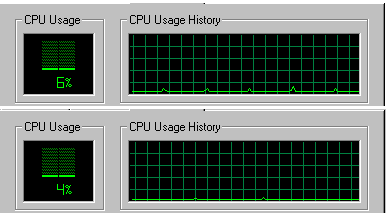
FIFO vs. On-Board Memory Frame Grabbers: Myths and RealityThere are currently two approaches in building frame grabbers: with or without a full frame buffer. Both approaches have pros and cons, but neither has an overall advantage. However, some of the myths keep appearing in periodicals, which creates confusion. We would like to clarify certain issues related to the performance of various frame grabber types. Historically, the full frame buffer frame grabbers were the first to appear, because the speed of the ISA bus was not sufficient to handle real time image transfer to the host (PC) memory. With the advent of the PCI bus, capable of that task, a second approach became feasible: digitized image could be transferred to the host without full frame buffering. With this approach, some buffering is still necessary to take care of possible bus latencies, but that could be achieved with the help of a relatively small, first in first out (FIFO) buffer. Myth #1: FIFO frame grabbers require more processor attention.Reality: They require as much attention from the host processor as on-board memory frame grabbers do. Provided a frame grabber has bus-mastering capability, it transfers the data to the host autonomously, once it is set up with the destination address and other parameters. There is absolutely no need for the processor to interfere at the end of every line ("every 64 microseconds"), like some authors claim. The claim comes from a misunderstanding of how the FIFO works. The important property of the FIFO buffer is that it does not need to be completely emptied before the new data could be written into it. Writing to and reading from the FIFO happen simultaneously, provided the input information does not overwrite what is already in the FIFO. The diagrams in Fig.1 show the CPU loading with no applications running (bottom diagram), and with the frame grabber continuously acquiring into the host memory (top). Fig.1 CPU usage with no applications running (bottom),and frame grabber
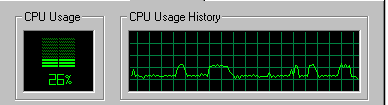
Even with the application software continuously displaying the image with the help of Windows API functions, the CPU usage is much less than some authors claim (Fig.2). Fig.2 CPU usage with the frame grabber continuously acquiring into host memory, and the application
It is worth mentioning here that there are more efficient ways (in terms of processor usage) of capturing and displaying the image (e.g. capturing directly into video memory), which the FIFO frame grabbers are capable of. Myth #2: On-board memory frame grabbers provide extra capabilities.Reality: With the exception of the capability to store the image on the board, FIFO frame grabbers can provide the same features: image scaling and/or cropping, de-interlacing (in the host memory), temporal decimation, etc. Example: Sensoray Model 611 frame grabber. Myth #3: Only on-board memory frame grabbers provide double buffering for seamless software interface.Reality: As the FIFO frame grabbers acquire images directly into the host memory, they can utilize multiple buffers, too. However, the number of buffers in this case is limited only by the available host memory, which allows such unique features as data streaming and frame sequence capture. Myth #4: "Frame grabbers with on-board memory cost a bit more than those without."Reality: Frame grabbers with on-board memory cost 50 to 100% more than those without. Myth #5: On-board memory frame grabbers are faster.Reality: In fact, they are slower. What some authors claim is that it takes a few extra milliseconds to transfer the image to the host memory after it has been acquired into the on-board buffer. With the FIFO frame grabber the image is being transferred as it is digitized, with the only delay being a FIFO delay (a few microseconds). ConclusionTo be objective we must mention that with the FIFO frame grabbers there is a remote possibility of losing data in case of extreme PCI latencies. This can happen if there are a number of devices utilizing the bus simultaneously. However, PCI arbitration normally does not allow any single device to take over the bus for an extended period of time; hence, the average throughput could be used as a fairly accurate performance estimate. Transfer of the 640 x 480 monochrome image at 30 fps requires less than 10 MB/s of the theoretical 132 MB/s of the PCI bandwidth, making information loss very unlikely. However, other than providing an obvious higher reliability (which is not that critical for a lot of applications, even in machine vision), the on-board memory frame grabbers do not have any other advantages over those with FIFO, the latter being considerably less expensive. |
|